
<strong id="0toem"><dl id="0toem"></dl></strong><b id="0toem"><menuitem id="0toem"></menuitem></b>

      <b id="0toem"><menuitem id="0toem"></menuitem></b>
    1. <code id="0toem"><abbr id="0toem"></abbr></code>
      <strong id="0toem"><dl id="0toem"></dl></strong>
      <kbd id="0toem"></kbd>
              1. <code id="0toem"></code>
                <th id="0toem"><progress id="0toem"></progress></th><strong id="0toem"><form id="0toem"></form></strong>

                <th id="0toem"></th>
              2. 131 1300 0010
                其他
                當前位置: 首頁>> 元件技術(shù)>>其他>>
              3. 導航欄目
              4. 二極管
              5. 整流橋
              6. MOS管
              7. 其他
              8. 如何采用單片機驅(qū)動液晶屏實現(xiàn)顯示圖片
                如何采用單片機驅(qū)動液晶屏實現(xiàn)顯示圖片
              9. 如何采用單片機驅(qū)動液晶屏實現(xiàn)顯示圖片
              10.   發(fā)布日期: 2019-09-27  瀏覽次數(shù): 1,713

                由于需要用到液晶屏(320*240)顯示圖片,而且圖片的數(shù)量比較多(好幾百張),并且圖片要求保存到16M的SPI FLASH里面,顯然如果不處理 16M的FLASH明顯是放不下去。后來同事說可以用壓縮算法RLE,并且用C#給我做了個小的軟件,壓縮圖片得到RLE壓縮后的數(shù)據(jù)。

                這個算法的缺點是 如果圖片顏色復雜就不好,所以顏色盡量單調(diào)些。


                1、RLE算法小工具的使用

                2、我使用的RLE和上面連接的區(qū)別(改進)

                3、單片機里面實現(xiàn)的方法

                1、RLE算法小工具的使用點擊打開鏈接

                這里是小工具的下載地址 http://download.csdn.net/detail/chen244798611/9696253

                使用:使用也非常簡單 下載下來RLETest.exe,點擊打開 --》界面就一個按鈕 “壓縮”---》點擊選擇圖片 自動壓縮

                提示完成可以看見生成
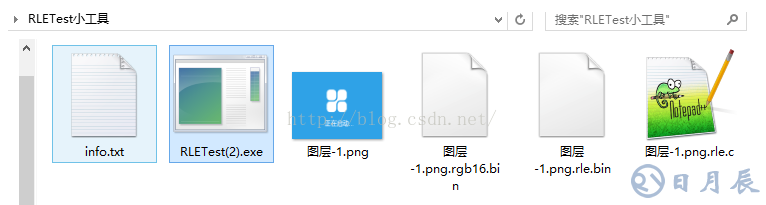
                如何采用單片機驅(qū)動液晶屏實現(xiàn)顯示圖片

                第一個里面有壓縮前和壓縮后的文件大小對比

                最后一個.c文件壓縮后得到一個數(shù)據(jù),可以保存到spi flash里面

                2、我使用的RLE和上面連接的區(qū)別(改進)

                由于采用的液晶屏是16位的數(shù)據(jù),那么比較可定應該是按照2字節(jié) 一個數(shù)據(jù)的比較,不能采用上面那種1個字節(jié)的比較。所以這里做了改進,其他都和上面那篇文章介紹一樣。并且采用的是上面文章介紹的最后一個改進算法,如下

                225intRle_Decode_O(unsignedchar*inbuf,intinSize,unsignedchar*outbuf,intonuBufSize)

                226{

                227unsignedchar*src=inbuf;

                228inTI;

                229intdecSize=0;

                230intcount=0;

                231

                232while(src《(inbuf+inSize))

                233{

                234 unsignedcharsign=*src++;

                235 intcount=sign&0x3F;

                236 if((decSize+count)》onuBufSize)/*輸出緩沖區(qū)空間不夠了*/

                237 {

                238 return-1;

                239 }

                240 if((sign&0x80)==0x80)/*連續(xù)重復數(shù)據(jù)標志*/

                241 {

                242 for(i=0;i

                243 {

                244 outbuf[decSize++]=*src;

                245 }

                246 src++;

                247 }

                248 else

                249 {

                250 for(i=0;i

                251 {

                252 outbuf[decSize++]=*src++;

                253 }

                254 }

                255}

                256

                257returndecSize;

                258}

                3、單片機里面實現(xiàn)的方法

                下面是在單片機里面實現(xiàn)的代碼,不過這里一個問題頻繁讀取 刷屏速度比較慢 測試發(fā)現(xiàn)要100多MS,后面改進了算法 ,并且采用FATFS管理SPI FLASH 測試發(fā)現(xiàn)28ms可以顯示一張圖片(不過顏色不是很復雜 復雜時間會更長)

                void lcd_display_image(uint32_t epromoffset)//保存在flsah中的地址

                {

                uint8_t buf[1024] = {0};//定義緩沖區(qū)大小

                uint32_t totlelen = 0;//用于保存數(shù)據(jù)總長度

                uint32_t index = 0;//索引

                uint8_t temp = 0;//臨時存放數(shù)據(jù)

                uint8_t count = 0;//連續(xù)數(shù)據(jù)個數(shù)

                uint16_t colour = 0;//保存顏色用如液晶顯示

                uint8_t i = 0;

                SPI_FLASH_ReadBuffer(buf,epromoffset, 3);//前3個字節(jié)保存數(shù)據(jù)的總長度

                epromoffset = epromoffset + 3;//flash 地址偏移3

                totlelen = buf[0] 《《 16 “ buf[1] 《《 8 | buf[2];//計算得到總長度

                LCD_SetWindows(0,319,0,239);//320 240 設(shè)置LCD顯示區(qū)域

                while(index 《 totlelen)//判斷 索引和文件總長度 退出的條件

                {

                SPI_FLASH_ReadBuffer(buf,epromoffset, 1);//讀數(shù)據(jù)

                epromoffset++;//flash 地址自加

                temp = buf[0];//得到讀取的數(shù)據(jù)

                index++;//索引自加

                count = temp & 0x7f;//得到連續(xù)的個數(shù)

                if((temp & 0x80) == 0x80)//判斷是否是相同 還是不同的 連續(xù)

                {

                SPI_FLASH_ReadBuffer(buf,epromoffset, 2);//相同連續(xù) 讀取兩個字節(jié)

                epromoffset = epromoffset + 2;

                index = index + 2;

                colour = buf[0] 《《 8 | buf[1];//組合成顏色 RGB 565

                for(i = 0;i 《 count;i++)

                {

                LCD_RAM = colour;//顯示 FSMC

                }

                }

                else//不相同 連續(xù)

                {

                //SPI_FLASH_ReadBuffer(buf,epromoffset, count *2);

                //讀取 count*2個數(shù)據(jù) 2個數(shù)據(jù)組成一個顏色數(shù)據(jù) count 個顏色數(shù)據(jù) 所以要*2

                SPI_DMA_FLASH_ReadBuffer_1(epromoffset,buf,count *2);

                epromoffset = epromoffset + count * 2;//地址偏移

                index = index + count * 2;

                for(i = 0; i 《 count * 2;i= i+2)

                {

                LCD_RAM = buf[i] 《《 8 | buf[i+1];//顯示

                }

                }

                }

                index = 0;

                }

                改進后的單片機程序

                void SPI_Flash_lcd_Fatfs_image(const char *filename)//文件名

                {

                uint8_t buf[piece_size] = {0};//開辟一個大的緩沖區(qū)

                uint32_t epromoffset = 0;

                uint32_t totlelen = 0;

                uint32_t index = 0;

                uint8_t temp = 0;

                uint32_t num = 0;

                uint8_t count = 0;

                uint16_t colour = 0;

                uint8_t i = 0,j = 0;

                uint16_t write_buf = 0;

                uint16_t read_buf = 0;

                SPI_Flash_ReadFileData_add(filename,buf,epromoffset,3,&num);//讀取總長度 采用FATFA

                epromoffset = epromoffset + 3;

                totlelen = buf[0] 《《 16 | buf[1] 《《 8 | buf[2];

                LCD_SetWindows(0,319,0,239);//320 240

                while(index 《 totlelen)

                {

                if(totlelen - index 》 piece_size)

                {

                SPI_Flash_ReadFileData_add(filename,buf,epromoffset,piece_size,&num);//讀取數(shù)據(jù)保存到緩沖區(qū)

                epromoffset = epromoffset + piece_size;

                read_buf = piece_size;

                index = index + piece_size;

                }

                else

                {

                SPI_Flash_ReadFileData_add(filename,buf,epromoffset,totlelen - index,&num);

                epromoffset = epromoffset + totlelen - index;

                read_buf = totlelen - index;

                index = totlelen;

                }

                while(write_buf 《 read_buf)

                {

                temp = buf[write_buf];

                write_buf++;

                count = temp & 0x7f;

                if((temp & 0x80) == 0x80)

                {

                if((read_buf- write_buf) 》 2)

                {

                colour = buf[write_buf] 《《 8 | buf[write_buf+1];

                write_buf = write_buf + 2;

                }

                else

                {

                write_buf = write_buf + 2;

                }

                for(i = 0;i 《 count;i++)

                {

                LCD_RAM = colour;

                }

                }

                else

                {

                count = count *2;

                j = 0;

                for(i = 0; i 《 count ;i= i+2)

                {

                if((read_buf - write_buf) 》 2)

                {

                colour = buf[write_buf] 《《 8 | buf[write_buf+1];

                LCD_RAM = colour;

                write_buf = write_buf +2;

                }

                else

                {

                SPI_Flash_ReadFileData_add(filename,buf,epromoffset + j,2,&num);//這里有點問題 需要改進 假如緩沖區(qū)數(shù)據(jù)讀完 就會出現(xiàn)點問題

                j = j + 2;

                LCD_RAM =buf[0] 《《 8 | buf[1];

                write_buf = write_buf +2;

                }

                }

                }

                }

                write_buf= write_buf %piece_size;

                }

                }

                這個程序還有點小
                來源;21ic


              11. ·上一篇:
                ·下一篇:
              12. 其他關(guān)聯(lián)資訊
                深圳市日月辰科技有限公司
                地址:深圳市寶安區(qū)松崗鎮(zhèn)潭頭第二工業(yè)城A區(qū)27棟3樓
                電話:0755-2955 6626
                傳真:0755-2978 1585
                手機:131 1300 0010
                郵箱:[email protected]

                深圳市日月辰科技有限公司 版權(quán)所有:Copyright?2010-2023 www.xydibang.com 電話:13113000010 粵ICP備2021111333號
                <strong id="0toem"><dl id="0toem"></dl></strong><b id="0toem"><menuitem id="0toem"></menuitem></b>

                    <b id="0toem"><menuitem id="0toem"></menuitem></b>
                  1. <code id="0toem"><abbr id="0toem"></abbr></code>
                    <strong id="0toem"><dl id="0toem"></dl></strong>
                    <kbd id="0toem"></kbd>
                            1. <code id="0toem"></code>
                              <th id="0toem"><progress id="0toem"></progress></th><strong id="0toem"><form id="0toem"></form></strong>

                              <th id="0toem"></th>
                            2. 亚洲欧美动漫中文字幕 | 日韩黄色免费网站 | 以及视频片又粗又猛 | 日韩欧美视频清纯中文字幕 | 成年人视频免费在线观看大香蕉 |