
131 1300 0010
<b id="0toem"><menuitem id="0toem"></menuitem></b>
<code id="0toem"><abbr id="0toem"></abbr></code>
<code id="0toem"></code>
一個(gè)完全從頭開始制作的自定義矩陣制作,想要玩的小伙伴試試看吧。
首先是LED矩陣的布局,該矩陣采用 16x8 配置,并以 OXPLOW 布局布局(OXPLOW 是一種矩陣類型,其中 LED 在一行中單向移動(dòng),然后在下一行向后移動(dòng),依此類推,也就是每一排的最后一個(gè)都連到下一排的第一個(gè),這種布局也稱為 boustrophedon)。還有另一種布局是蛇形布局,LED 像蛇一樣以連續(xù)的鏈條布局。
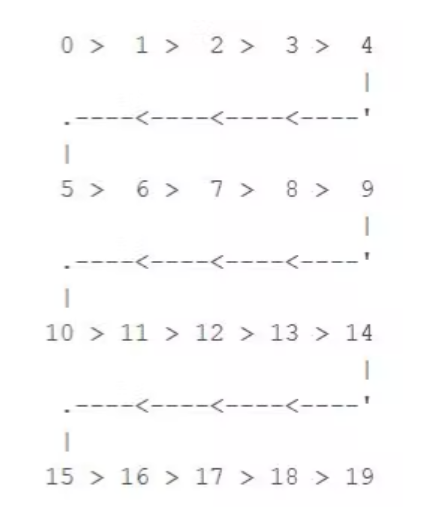
矩陣通過FAST LED庫控制,但可以使用Adafruit的Neopixel庫或SmartMatrix庫等一系列現(xiàn)有庫進(jìn)行操作。
所需材料有:WS2812B 發(fā)光二極管、定制電路板、Arduino?Nano、面包板。
WS2812B不陌生吧,之前達(dá)爾聞?wù)f也發(fā)過很多WS2812B的項(xiàng)目。WS2812B是一款智能控制LED光源,將控制電路和RGB芯片集成到5050組件封裝中,內(nèi)部包括智能數(shù)字端口數(shù)據(jù)鎖存器和信號(hào)整形放大驅(qū)動(dòng)電路。
數(shù)據(jù)傳輸協(xié)議使用單 NZR 通信模式。上電復(fù)位后,DIN端口接收來自控制器的數(shù)據(jù),第一個(gè)像素收集初始24位數(shù)據(jù)然后發(fā)送到內(nèi)部數(shù)據(jù)鎖存器,其他通過內(nèi)部信號(hào)整形放大電路重塑的數(shù)據(jù)通過DO端口發(fā)送到下一個(gè)級(jí)聯(lián)像素。

WS2812B工作電壓在+3.5~+5.3V?DC之間。
從原理圖開始設(shè)計(jì),該原理圖由 128 個(gè) RGB LED 組成,在 OXPLOW 布局中來回連接。有一個(gè) CON4 接插件,用于連接 VCC、GND、Din 和 Dout 引腳,也有單獨(dú)的用于 VCC、GND 和 Din 的三個(gè)不同引腳連接。所有 LED 的 VCC 和 GND 都并聯(lián)連接。
第 1 個(gè)的 Dout 進(jìn)入第 2 個(gè)的 Din,第 2 個(gè)的 Dout 轉(zhuǎn)到第 3 個(gè)像素的 Din,一直持續(xù)到第 128 個(gè)。
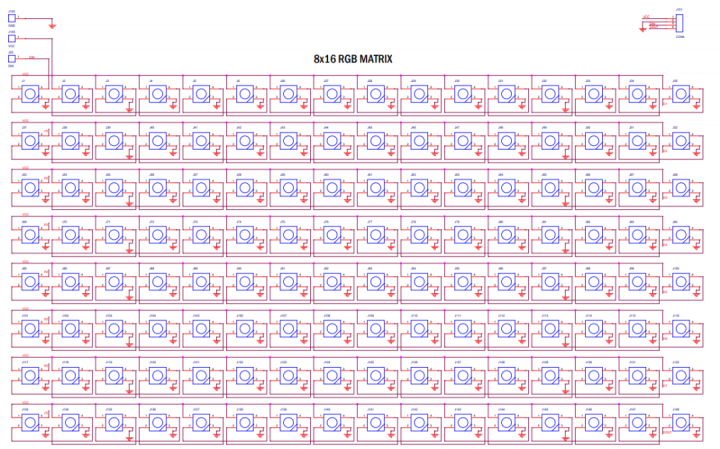
每個(gè)WS2812 LED都需要一個(gè)0.1uF的電容器才能正常工作,但由于空間有限,沒有添加電容器。該板工作正常,但如果它有一些問題,可以添加一個(gè)帶有VCC和GND的外部電容。
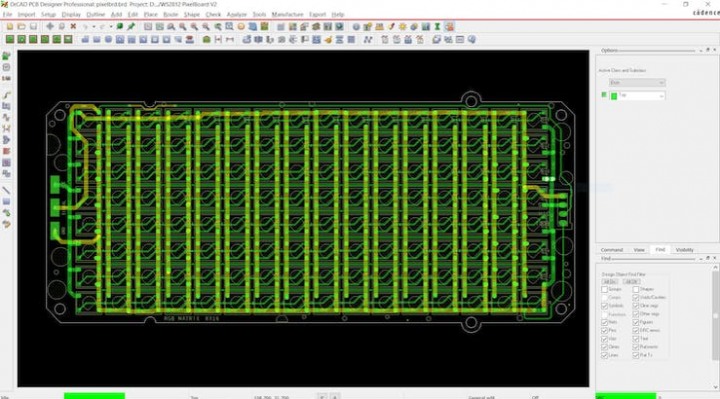
然后進(jìn)行PCB制作與打樣、器件焊接:
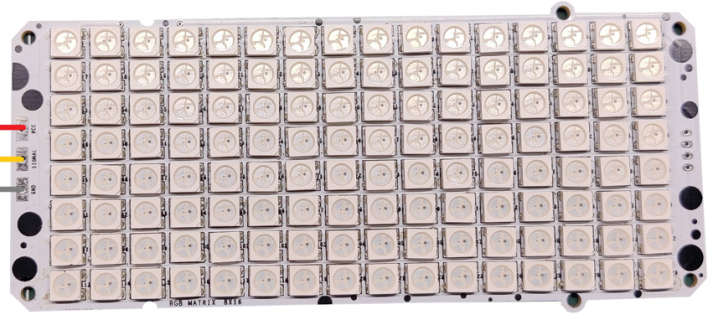
要驅(qū)動(dòng)矩陣板,需要按照下面的接線圖將Arduino Nano連接到矩陣。

矩陣的VCC將連接到Arduino的5V
接地到接地
矩陣至D9的Din(任何PWM引腳)
為了使用這個(gè)板,可以利用一堆現(xiàn)有的庫,比如 FASTLED 庫。 FASTLED是一個(gè)用于控制各種LED芯片組的庫,例如adafruit(Neopixel,DotStar,LPD8806),Sparkfun(WS2801)等。 這是它的GitHub頁面,需要在Arduino IDE中下載并安裝庫。https://github.com/FastLED/FastLED 這是將使用的主程序,被稱為NoisePlusPalette,可以在FASTLED示例中找到。
#include


#define LED_PIN     9
#define BRIGHTNESS  96
#define LED_TYPE    WS2811
#define COLOR_ORDER GRB


const uint8_t kMatrixWidth  = 16;
const uint8_t kMatrixHeight = 8;
const?bool????kMatrixSerpenTIneLayout?=?false;


#define NUM_LEDS (kMatrixWidth * kMatrixHeight)
#define MAX_DIMENSION ((kMatrixWidth>kMatrixHeight) ? kMatrixWidth : kMatrixHeight)


// The leds
CRGB leds[kMatrixWidth * kMatrixHeight];


staTIc uint16_t x;
staTIc uint16_t y;
staTIc uint16_t z;


uint16_t?speed?=?20;?//?speed?is?set?dynamically?once?we've?started?up
uint16_t scale = 30; // scale is set dynamically once we've started up


uint8_t noise[MAX_DIMENSION][MAX_DIMENSION];


CRGBPalette16 currentPalette( PartyColors_p );
uint8_t       colorLoop = 1;


void setup() {
  delay(3000);
  LEDS.addLeds<led_type,led_pin,color_order>(leds,NUM_LEDS);
  LEDS.setBrightness(BRIGHTNESS);


  // Initialize our coordinates to some random values
  x = random16();
  y = random16();
  z = random16();
}
// Fill the x/y array of 8-bit noise values using the inoise8 function.
void?fillnoise8()?{
  uint8_t dataSmoothing = 0;
  if( speed < 50) {
    dataSmoothing = 200 - (speed * 4);
  }

  for(int i = 0; i < MAX_DIMENSION; i++) {
    int ioffset = scale * i;
    for(int j = 0; j < MAX_DIMENSION; j++) {
      int joffset = scale * j;

      uint8_t data = inoise8(x + ioffset,y + joffset,z);


      data = qsub8(data,16);
      data = qadd8(data,scale8(data,39));


      if( dataSmoothing ) {
        uint8_t olddata = noise[i][j];
        uint8_t newdata = scale8( olddata, dataSmoothing) + scale8( data, 256 - dataSmoothing);
        data = newdata;
      }

      noise[i][j] = data;
    }
  }

??z?+=?speed;
  // apply slow drift to X and Y, just for visual variation.
  x += speed / 8;
  y -= speed / 16;
}


void mapNoiseToLEDsUsingPalette()
{
  static uint8_t ihue=0;

  for(int i = 0; i < kMatrixWidth; i++) {
    for(int j = 0; j < kMatrixHeight; j++) {


      uint8_t index = noise[j][i];
      uint8_t bri =   noise[i][j];


      if( colorLoop) {
        index += ihue;
      }


      if( bri > 127 ) {
        bri = 255;
      } else {
        bri = dim8_raw( bri * 2);
      }


      CRGB color = ColorFromPalette( currentPalette, index, bri);
      leds[XY(i,j)] = color;
    }
  }

  ihue+=1;
}


void loop() {
  // Periodically choose a new palette, speed, and scale
  ChangePaletteAndSettingsPeriodically();


  fillnoise8();


  mapNoiseToLEDsUsingPalette();


  LEDS.show();
  // delay(10);
}


#define?HOLD_PALETTES_X_TIMES_AS_LONG?1
void ChangePaletteAndSettingsPeriodically()
{
  uint8_t secondHand = ((millis() / 1000) / HOLD_PALETTES_X_TIMES_AS_LONG) % 60;
  static uint8_t lastSecond = 99;

  if( lastSecond != secondHand) {
    lastSecond = secondHand;
    if( secondHand ==  0)  { currentPalette = RainbowColors_p;         speed = 20; scale = 30; colorLoop = 1; }
    if( secondHand ==  5)  { SetupPurpleAndGreenPalette();             speed = 10; scale = 50; colorLoop = 1; }
    if( secondHand == 10)  { SetupBlackAndWhiteStripedPalette();       speed = 20; scale = 30; colorLoop = 1; }
    if( secondHand == 15)  { currentPalette = ForestColors_p;          speed =  8; scale =120; colorLoop = 0; }
    if( secondHand == 20)  { currentPalette = CloudColors_p;           speed =  4; scale = 30; colorLoop = 0; }
    if( secondHand == 25)  { currentPalette = LavaColors_p;            speed =  8; scale = 50; colorLoop = 0; }
    if( secondHand == 30)  { currentPalette = OceanColors_p;           speed = 20; scale = 90; colorLoop = 0; }
    if( secondHand == 35)  { currentPalette = PartyColors_p;           speed = 20; scale = 30; colorLoop = 1; }
    if( secondHand == 40)  { SetupRandomPalette();                     speed = 20; scale = 20; colorLoop = 1; }
    if( secondHand == 45)  { SetupRandomPalette();                     speed = 50; scale = 50; colorLoop = 1; }
    if( secondHand == 50)  { SetupRandomPalette();                     speed = 90; scale = 90; colorLoop = 1; }
    if( secondHand == 55)  { currentPalette = RainbowStripeColors_p;   speed = 30; scale = 20; colorLoop = 1; }
  }
}


void SetupRandomPalette()
{
  currentPalette = CRGBPalette16(
                      CHSV( random8(), 255, 32),
                      CHSV( random8(), 255, 255),
                      CHSV( random8(), 128, 255),
                      CHSV( random8(), 255, 255));
}


void SetupBlackAndWhiteStripedPalette()
{
  // 'black out' all 16 palette entries...
  fill_solid( currentPalette, 16, CRGB::Black);
  // and set every fourth one to white.
  currentPalette[0] = CRGB::White;
  currentPalette[4] = CRGB::White;
  currentPalette[8] = CRGB::White;
??currentPalette[12]?=?CRGB::White;
}
// This function sets up a palette of purple and green stripes.
void SetupPurpleAndGreenPalette()
{
  CRGB purple = CHSV( HUE_PURPLE, 255, 255);
  CRGB green  = CHSV( HUE_GREEN, 255, 255);
  CRGB black  = CRGB::Black;

  currentPalette = CRGBPalette16(
    green,  green,  black,  black,
    purple, purple, black,  black,
    green,  green,  black,  black,
    purple, purple, black,  black );
}


uint16_t XY( uint8_t x, uint8_t y)
{
  uint16_t i;
  if( kMatrixSerpentineLayout == false) {
    i = (y * kMatrixWidth) + x;
  }
  if( kMatrixSerpentineLayout == true) {
    if( y & 0x01) {
      // Odd rows run backwards
      uint8_t reverseX = (kMatrixWidth - 1) - x;
      i = (y * kMatrixWidth) + reverseX;
    } else {
      // Even rows run forwards
      i = (y * kMatrixWidth) + x;
    }
  }
  return i;
}</led_type,led_pin,color_order>
?
以下是需要從示例中需要更改的一些內(nèi)容:
#define LED_PIN     9
#define BRIGHTNESS  96
#define LED_TYPE    WS2811
#define COLOR_ORDER GRB


const uint8_t kMatrixWidth  = 16;
const uint8_t kMatrixHeight = 8;
const bool    kMatrixSerpentineLayout = false;
? 根據(jù)連接的 Pin 更改LED_PIN,亮度也可以控制在0-255。kMatrix寬度和高度也需要根據(jù)矩陣布局(16x8)進(jìn)行更改。kMatrixSerpentineLayout 需要設(shè)置為 false。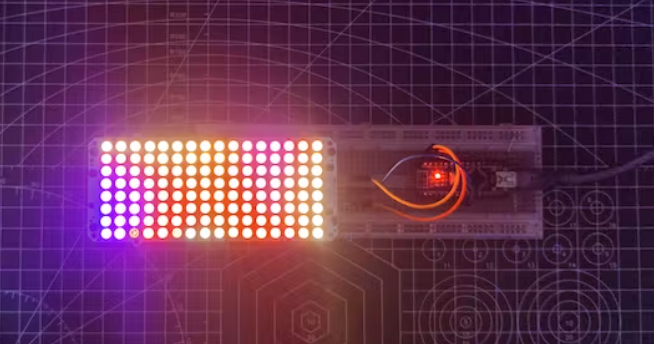 ?
?
最基礎(chǔ)的LED驅(qū)動(dòng)就完成了,接下來可以做更大的矩陣,比如16x16 甚至更大,并使用軟件將一些視頻投影到矩陣上,目標(biāo)是通過添加更多像素清楚地看到投影在矩陣上的視頻或圖像。

<b id="0toem"><menuitem id="0toem"></menuitem></b>
<code id="0toem"><abbr id="0toem"></abbr></code>
<code id="0toem"></code>